A 61% Perfect Rate Is Being Called SOTA: Document Extraction Starts Pricing for 'Can't-Afford-to-Lose' Use Cases
LlamaIndex has added a max effort switch to Agentic Plus for Extract. On the hardest documents, field accuracy jumps from 12.7 to 95, and the price per document rises from 7 cents to $4.20. The company says this is built for scenarios that absolutely require 100% accuracy—yet on its own benchmark, the perfect rate is only 61%.
The hard part of document extraction has never been clean files.
Invoices, contracts, and standard PDFs—any extraction API can now score in the 90s on these. What actually stalls the pipeline is another category of documents: hundreds-of-pages insurance rate filings, well-log plots filled with curves, architectural blueprints, and Excel exports from 2012 with eight charts crammed onto one page. The common thread is that the model takes one look and thinks it has understood the document, and it doesn't report where it went wrong.
Today LlamaIndex added a switch to the Agentic Plus tier of Extract: max effort. The official description is direct: it's intended for scenarios where "100% extraction accuracy is absolutely required," and it handles the densest documents and the most complex schemas.

To judge whether an extraction feature is worth it, two numbers are enough: how much more accurate it can be at the same cost, and how much it costs to reach the accuracy limit.
The first number LlamaIndex gives is 61%. On its own ExtractBench Pro, max effort's perfect extraction rate is 61%, which the company calls the new SOTA. Perfect extraction means every field in the entire document is correct—not a single one can be wrong. At the same time, field-level Value F1 rises from 77.7 for standard Agentic Plus to 94.3.
These two numbers only make sense together. A field-level score of 94 means most fields are correct, but only 61% of documents are fully correct; in the remaining 39%, at least one field has a problem. Someone pointed this out directly in the comments: you're advertising it for "when you need 100% accuracy," yet the SOTA is 61% perfect. In a scenario like insurance rate filings, that gap still means every field needs human review—and the review step should be written into the pitch.
That criticism holds. 61% is not shameful, but it determines what this feature actually is: high-precision preprocessing that backstops human review, or a replacement that eliminates review. Those are two different businesses.

In the curve chart, the x-axis is cost per page and the y-axis is quality. Max effort pushes the upper-right edge of the curve outward a bit, positioned behind Codex Astra and Claude Code + Opus. The official claim is that it wins on cost-effectiveness against those two combinations.
The tiered data reveals how this thing is really used. The blog lists six challenge categories, comparing standard tier vs. max effort:
| Category | Value F1 (standard → max) | Cost per document (standard → max) |
|---|---|---|
| Long, dense pages | 12.7 → 95.0 | $0.075 → $4.19 |
| Relationship diagrams | 49.3 → 98.7 | $1.32 → $3.45 |
| Document conventions | 97.5 → 99.8 | $2.98 → $4.74 |
| Custom terminology | 98.6 → 99.7 | $3.25 → $3.37 |
| Charts | 94.3 → 95.0 | $1.67 → $2.60 |
| Counting | 67.6 → 68.7 | $1.41 → $1.55 |
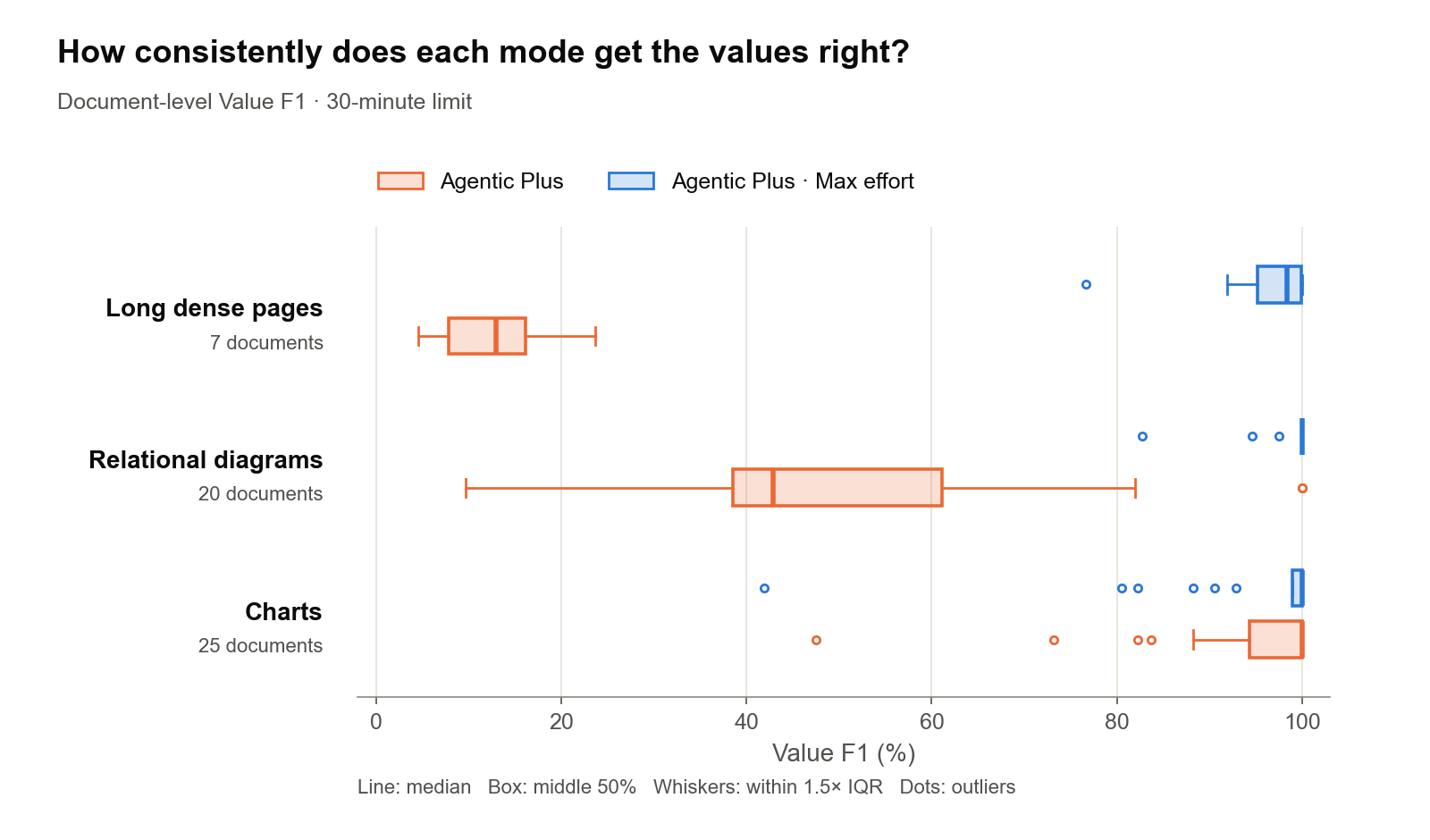
For long, dense pages, Value F1 goes from 12.7 to 95.0, and cost per document goes from 7.5 cents to $4.19—a 55x increase. Relationship diagrams go from 49.3 to 98.7 at less than 3x the cost. Charts only go from 94.3 to 95.0, with cost rising from $1.67 to $2.60. Counting barely moves, from 67.6 to 68.7.
This is essentially a routing problem. The same switch is a lifesaver on long, dense pages and a waste of money on counting tasks. A commenter summed it up well: read the cost column first, then decide whether to turn it on. Max effort is a decision routed by document type, priced against the cost of a single wrong field.
At the mechanism level, to keep per-page pricing predictable, the standard tier sacrifices resolution when rendering PDFs to images. If numbers on a chart are too small or legend colors are too close, they blur together. When max effort encounters an area that needs it, it re-reads that area at higher resolution, specifically zooming in on charts and diagrams to read the values.
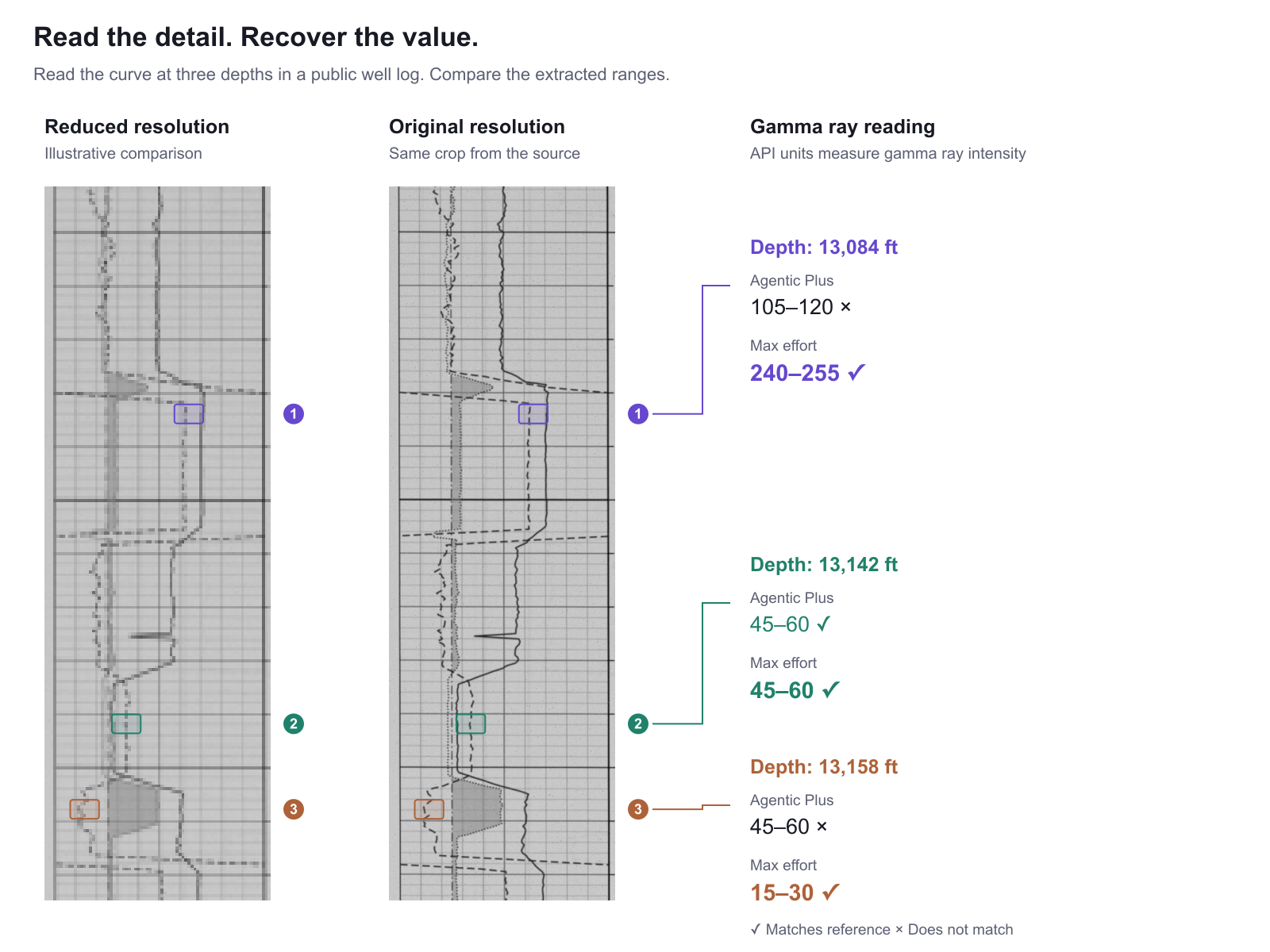
Someone in the comments asked exactly the right question: is it re-cropping the chart and reading it a second time, or doing one big scan of the entire page? Based on the official description, it's closer to the former—on-demand local zoom rather than uniformly increasing resolution for the whole page. That's also why it can keep costs under control: it spends extra compute only where needed.
There's little friction to using it. In the Python SDK, it's just one line added to the existing configuration:
configuration={
    "tier": "agentic_plus",
    "effort": "max",
    "version": "latest",
}
The schema and other options stay the same. The official recommendation is to first run it on a representative sample, align the schema, get a clear view of quality and cost, and then migrate—don't switch everything over at once.
The document extraction business is shifting from "how much per page" to "how much does one wrong field cost." That shift is good news for buyers—at least price and risk are now linked. But for sellers, the real test isn't the 61% on the bench; it's whether they can flag the remaining 39% and hand it to humans. No one will pay 55x more for a 61% perfect rate unless the system can tell them which 39% needs to be looked at.
- Blog: https://www.llamaindex.ai/blog/introducing-max-effort-for-extract-agentic-plus
- Benchmark: https://extractbenchpro.ai/
- Dataset: https://huggingface.co/datasets/llamaindex/ExtractBenchPro
- Try online: https://cloud.llamaindex.ai/
- Configuration guide: https://developers.llamaindex.ai/llamaparse/extract/guides/configuring-extract/
发布时间: 2026-10-31 15:50