Always-On Agents Spend Most of Their Time Asleep
Anthropic published a guide on building always-on agents and broke it down into five core components. The most counterintuitive point: these agents are not awake all the time. They spend the vast majority of their time dormant, are woken by events, finish a run, and go back to sleep.
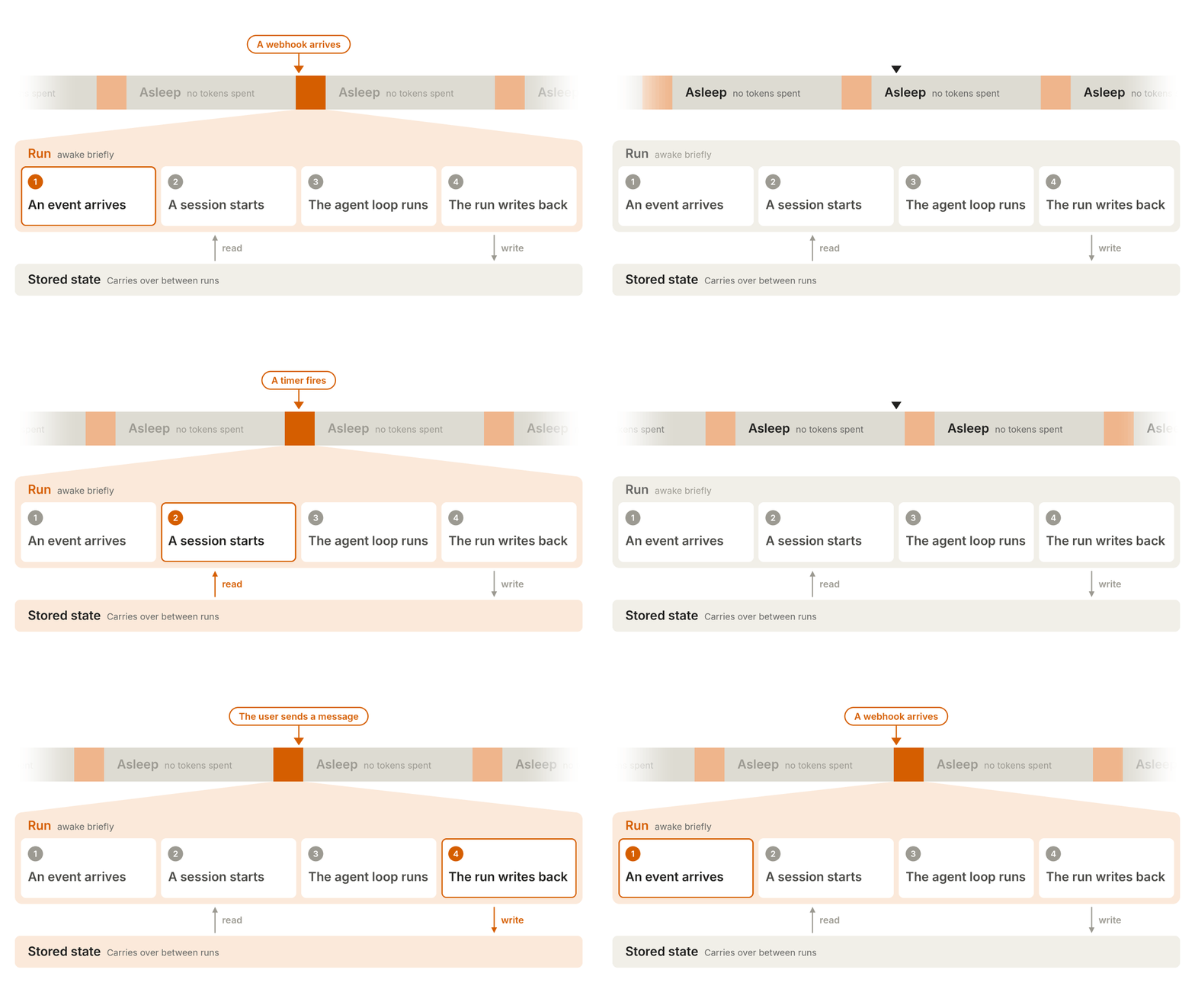
"Always-on agent" makes it easy to think the agent is awake all the time. A recent Anthropic guide to building always-on agents makes this clear: these agents spend most of their time asleep, consume no tokens, wake up only when an event arrives, do a piece of work, save their state, and go back to sleep. "Always-on" describes the user experience, not the runtime state.
Each time it is woken up to do work is called a run. A run executes within a session, and a session is the record of messages and tool calls. When a run ends, the agent goes back to sleep, and this loop can continue indefinitely.
The author is William Hu. He notes that one reason for this wave of always-on agents is that model judgment has improved: models understand user intent better and know better when to ask a question. Another reason is that intelligence is getting cheaper. Long-horizon tasks benefit most clearly. For example, on a long-horizon coding benchmark, Opus 5.5 costs 78% less per solved task than Opus 5, while on ordinary workloads it costs only 40% less.
Five parts
The peripheral architecture of an always-on agent breaks down into five pieces: an event inbox, timers, memory, permissions, and an outbox.
1. Event inbox
Most agents start only when the user sends a message. Always-on agents can be triggered by many sources: webhooks, scheduled jobs, and background jobs. The intuitive approach is to let each event source call the agent directly, but this creates problems. If two events arrive at the same time, two runs start and fight each other; if the process crashes, events are simply lost.
So you need an inbox. Event sources do not call the agent directly; they write events into the inbox, and a worker takes them out and processes them.
The simplest version has three pieces: a persistent event table, usually in a database; a handler, usually an HTTP endpoint, that writes events; and a worker, usually a background service, that reads events. The inbox must record the state of each event and deduplicate by a unique identifier from the source. If the event is continuing previous work, such as a user reply, restore the existing session; otherwise, start a new session.
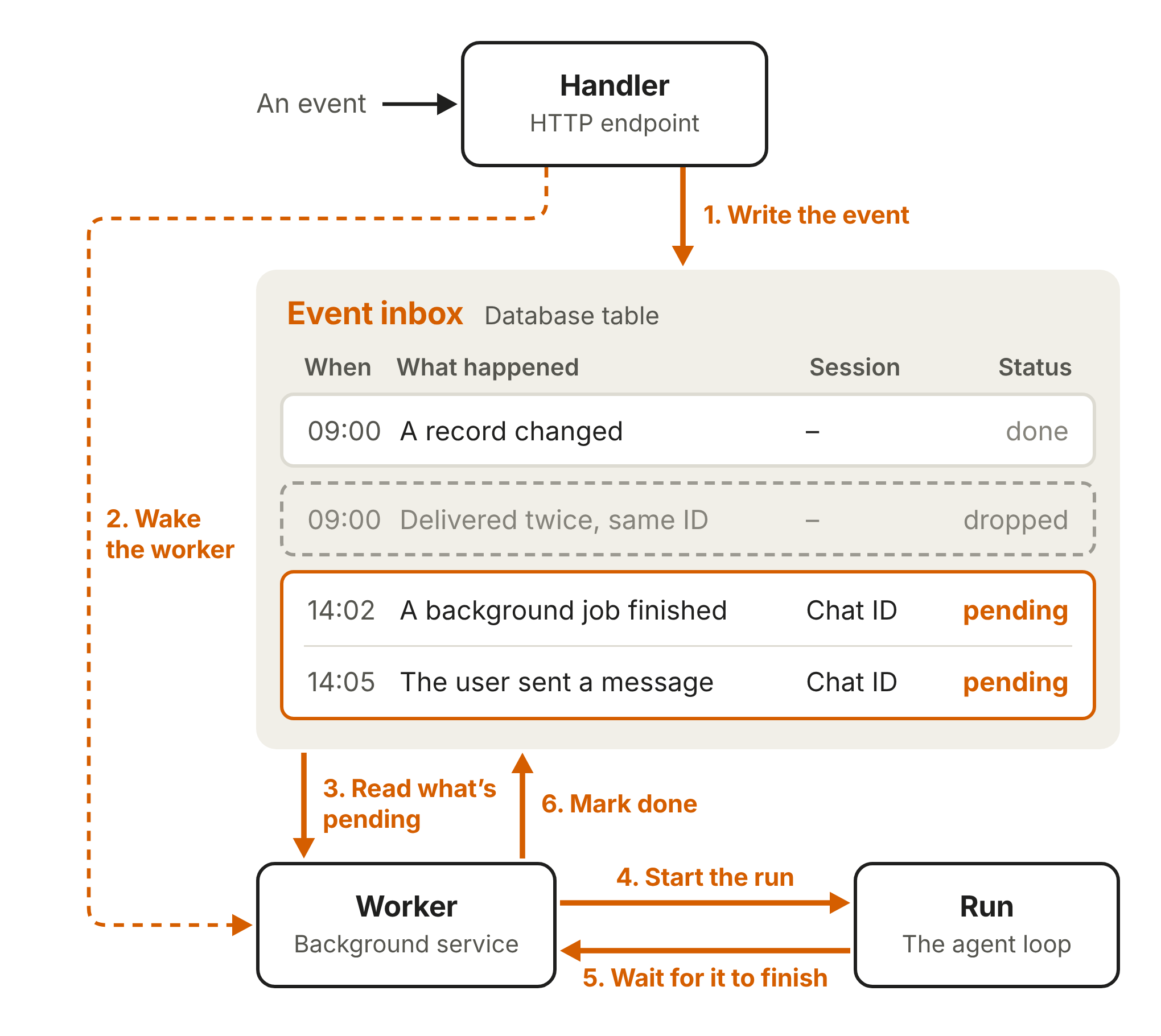
A few practices: the handler should respond quickly, because webhook providers treat slow responses as failures; deeper checks such as prompt-injection detection should be left to the run. The inbox is the single source of truth; when the worker is woken, it first pulls the latest events, and after a crash a new worker can retry from the same event. An inbox can have only one active worker at a time; otherwise, two runs may duplicate work or overwrite each other. Multiple pending events should be batched: if a user sends several messages in a row, combine them into one run and reply only once.
2. Timers
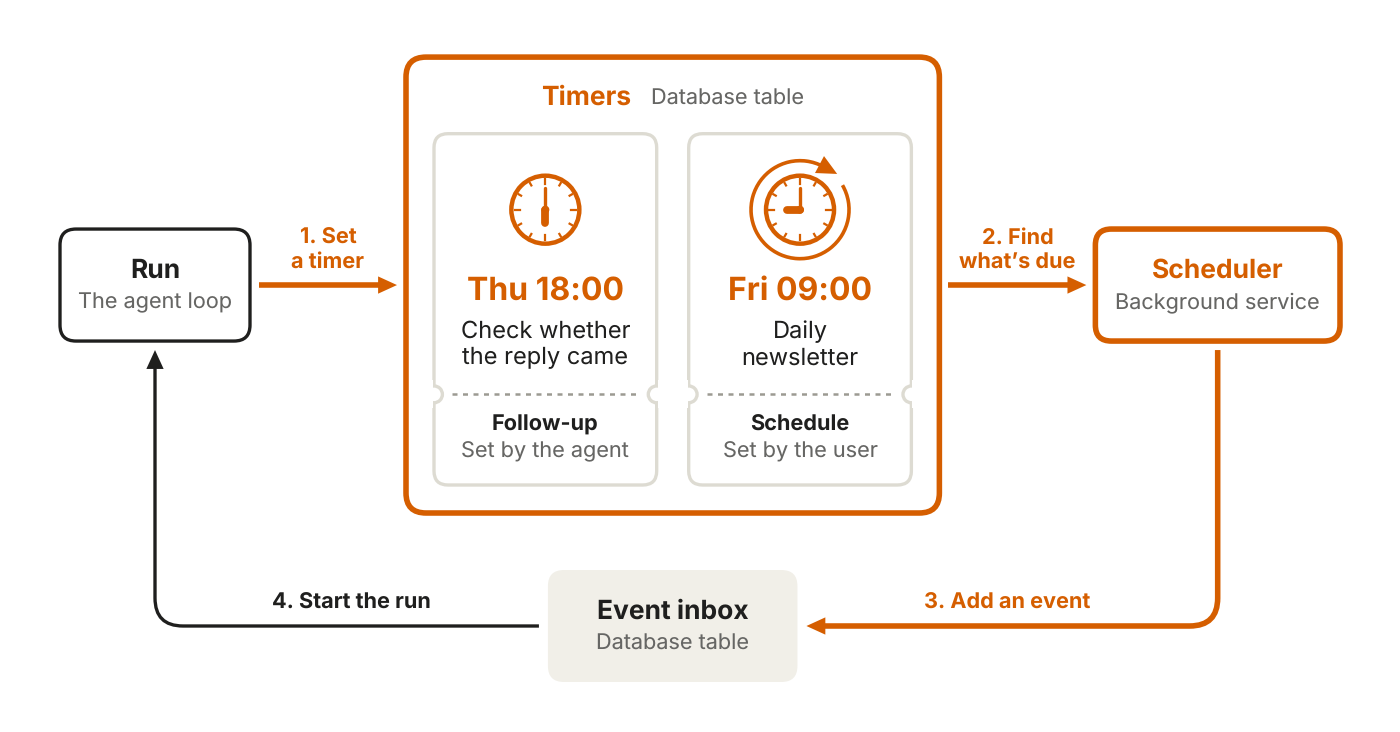
Timers make the agent proactive. There are two kinds. A follow-up is a deadline the agent sets for itself, for example to check back later for a reply. A schedule is a recurring task set by the user, for example sending a daily briefing.
Store timers separately; don't stuff them into the inbox. The inbox should contain only events that are ready to process. Timers do not start runs by themselves. A scheduler must poll at a fixed interval, find the ones that are due, mark follow-ups complete, push the next time for schedules, then write an event into the inbox and wake the worker. You can write the scheduler yourself or use a durable execution engine.
3. Memory
The runs of an always-on agent are disconnected from one another; continuity depends on memory. Memory is also stored separately. Claude Code's auto memory and the Messages API's memory tool implement it as a directory of files. In an always-on setting, this directory maps to persistent storage, a database or object storage, so memory survives even if the worker dies.
Principle: store only what the agent cannot look up again. If something already exists elsewhere, such as the contents of an issue tracker, store a pointer.
There are four categories. User instructions are loaded at the start of every run, because the user is not always around watching. User notes — role, preferences, corrections given — can start as one file and be split into smaller files as they grow; load only an index at the start and pull details when needed. Historical messages avoid telling the user the same thing twice. Task progress: one progress file per in-progress task, stating what is done and what remains, so a new run can read it and continue.
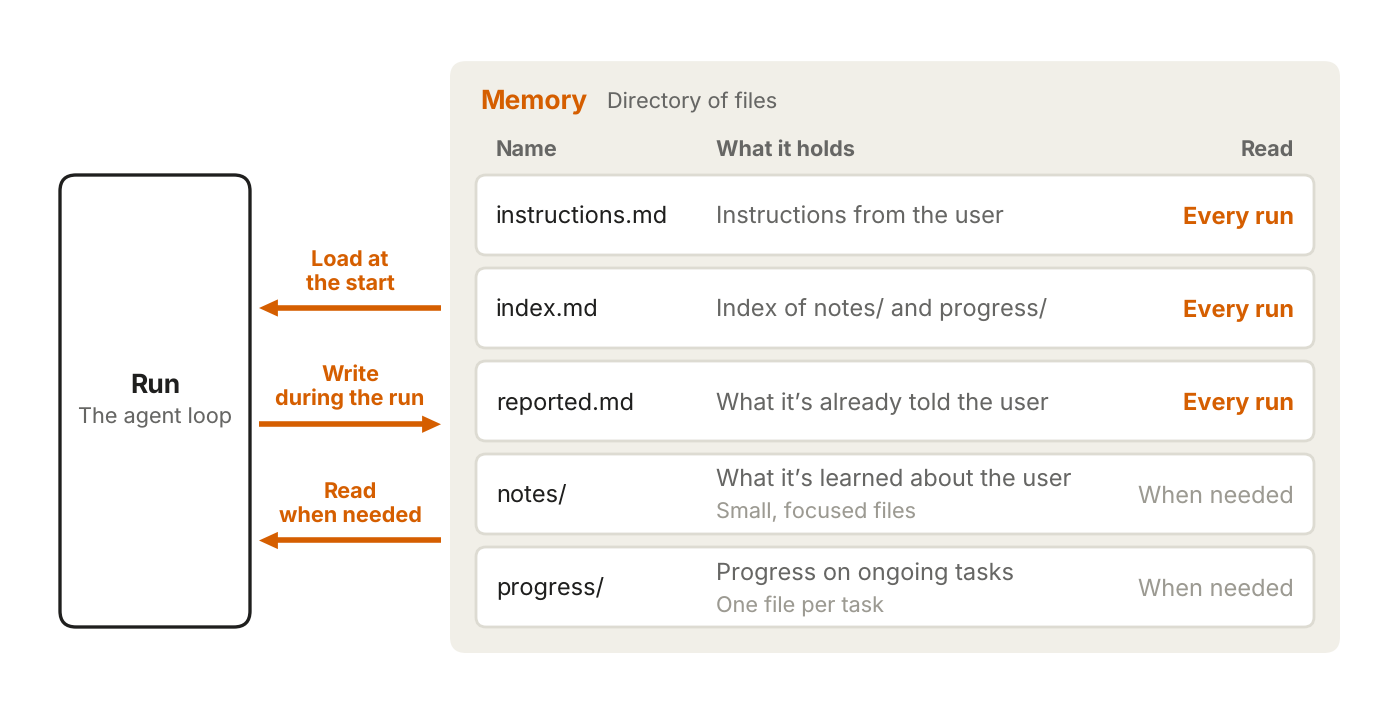
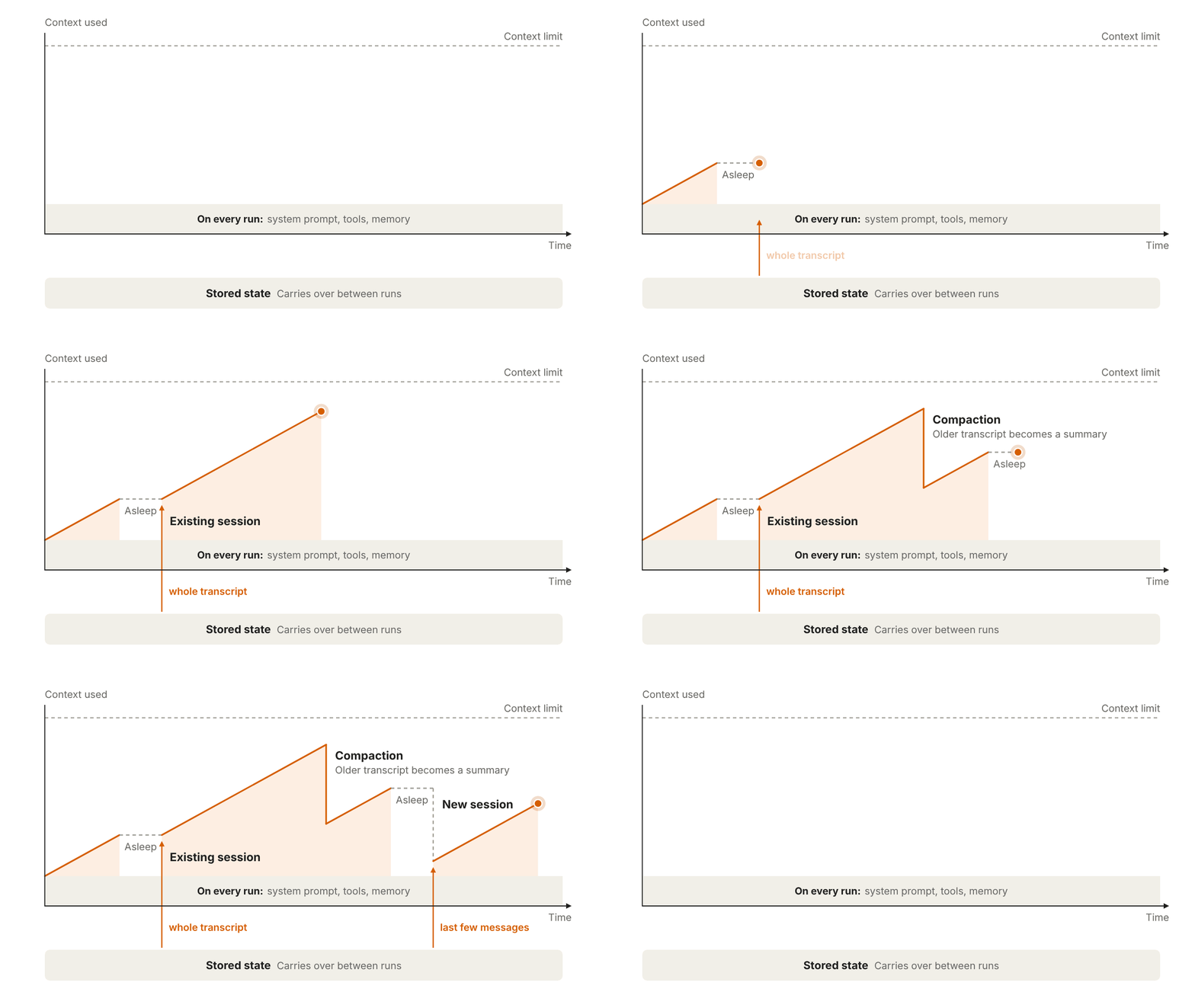
The part loaded at the start is called context overhead. It is carried on every run, so keep it as lean as possible and use prompt caching to reduce cost. If a session gets too long, you can compress old messages or start a new one; both lose detail, so anything that must be kept should be written to memory at the time. There is also a mechanism called dreaming that goes back through historical sessions to organize memory, replace outdated entries, and find patterns that only emerge across multiple runs.
4. Permissions
Permissions are the riskiest part of always-on agents. A run holds the user's permissions with no one watching. For each tool call, the agent must decide on its own: do it directly, block it, or wait for human approval.
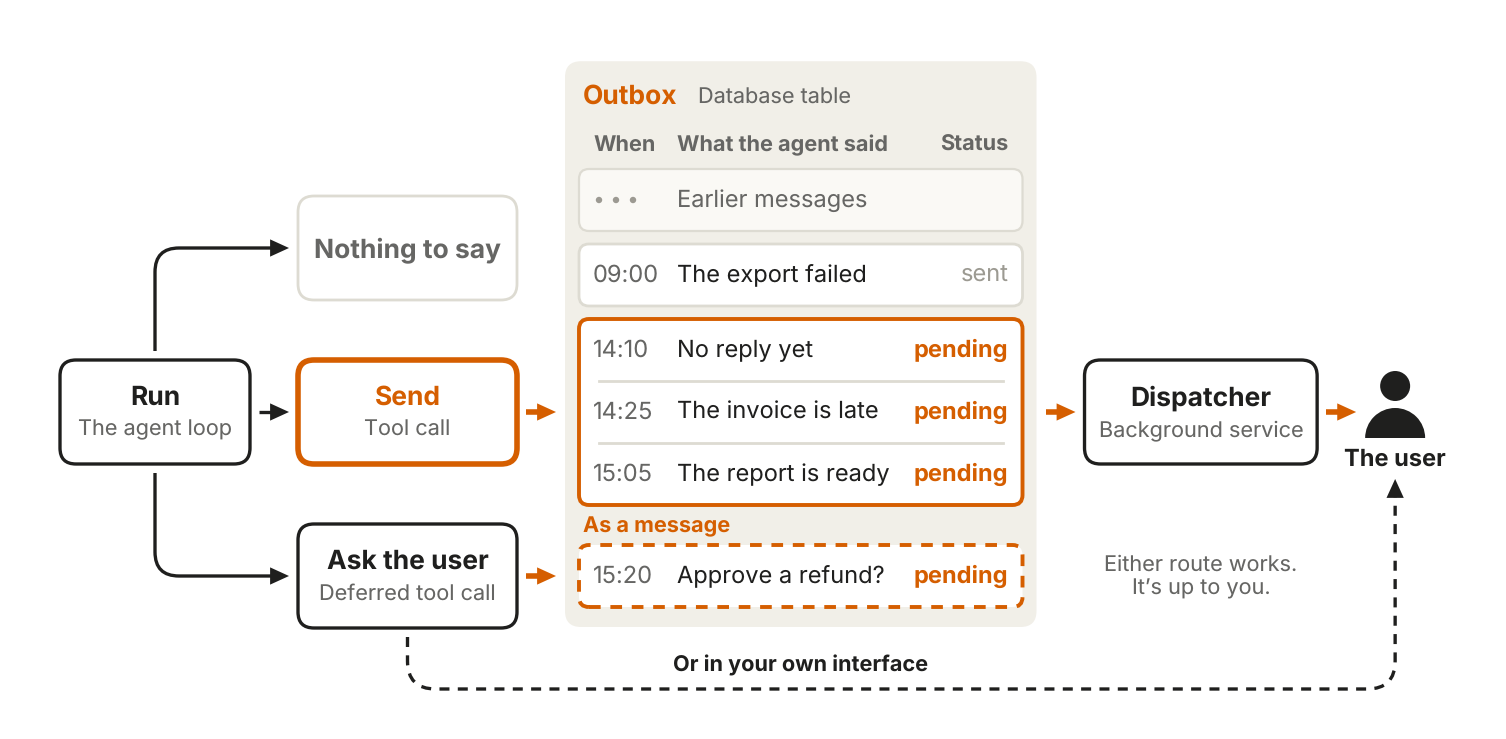
Three pieces. Credential storage: the recommended approach is to put a proxy outside the agent environment; the agent sends requests without credentials, and the proxy injects the real credentials and forwards them. Auto mode uses a classifier to review high-risk operations; dangerous ones are blocked and the model is asked to find a safer path, but important decisions still need a human. Deferred tool call is a clever design: when clarification or approval is needed, the run simply ends, the session is saved mid-way, the request is presented to the user as an interactive card or similar, and the user's answer comes back to the inbox as an event; a new run restores the saved session. While waiting, the worker can process other events and is not blocked.
5. Outbox
Most agents stream output as they generate it, with the user watching the whole time. Always-on agents mostly live in the background; the user gets results and a small amount of detail, not the entire process.
A run has three endings: send a message to the outbox, decide there is nothing to say, or use a deferred tool call to request permission or additional information. For most always-on agents, a send tool that sends directly is enough; you need a formal outbox only when you need to throttle messages or recover from errors. The outbox is a separate outbound-message table, corresponding to the inbox; there is also a dispatcher, corresponding to the worker, that reads pending messages, decides which ones to send, and delivers them to the user.
More troublesome than delivery is tuning message frequency. Send too many and it becomes noise; send too few and you miss things the user should know. It is recommended to build evals to find the balance. In practice, let the agent stay quiet first and gradually earn attention.
Putting it together
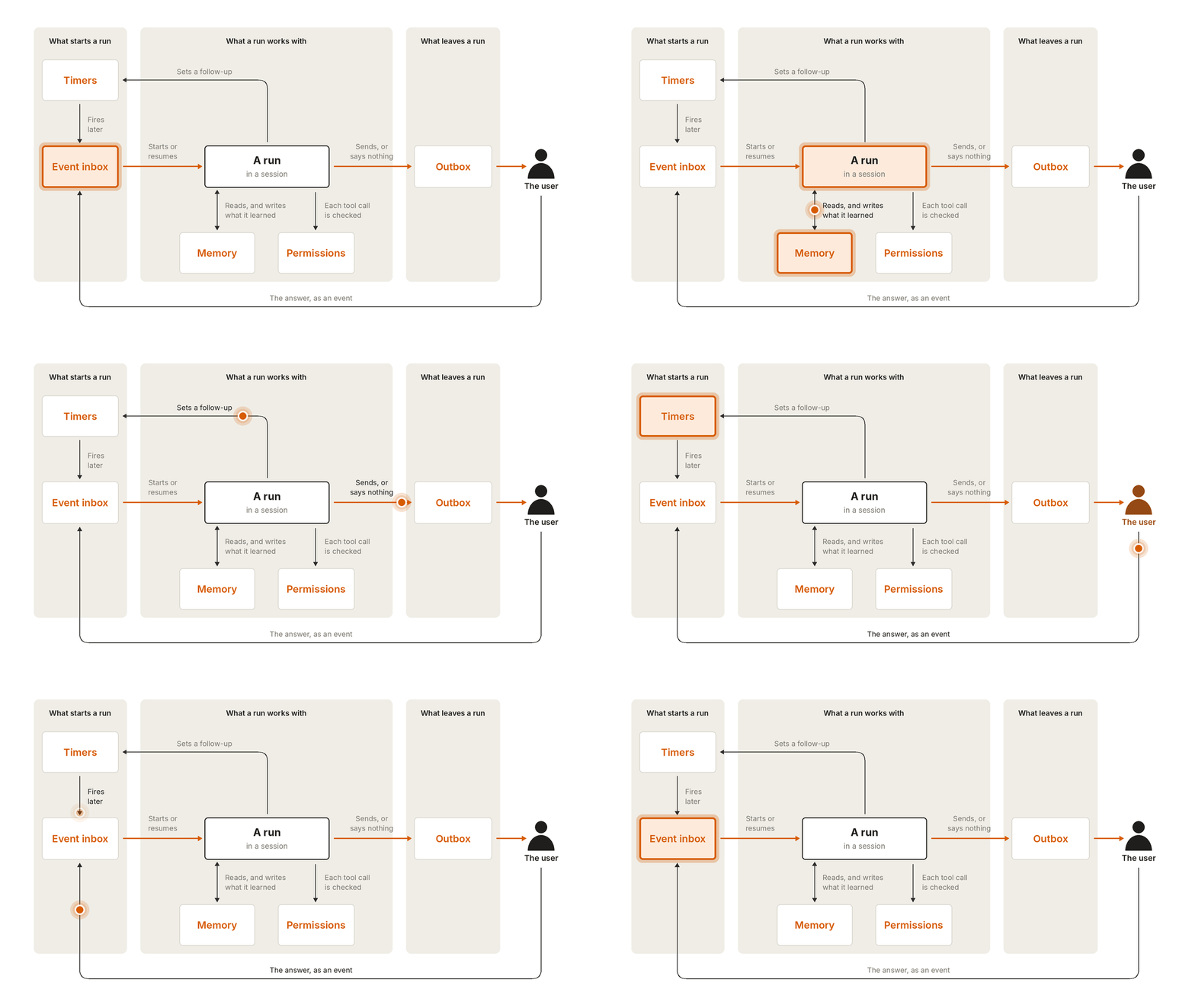
Every run starts with an event from the inbox, whether it is a user message, a webhook, or a timer. The worker takes the event, starts a run, and wakes the agent in a new or existing session. The agent reads memory to get its baseline, acts within its permissions, and writes what it learned back to memory. When the run ends, it pushes a row to the outbox, and the dispatcher sends the message to the user. When the user replies, the answer becomes an event and returns to the inbox. A run can set timers, and when a timer is due it wakes the agent again. Each run is short, the loop keeps turning, and that is where the feel of "always-on" comes from.
The comments filled a few holes
Problems that the official guide did not expand on but that people who have already built these systems hit first are scattered across Twitter replies.
Someone mentioned that next to the inbox you need a persistent "completed" record; otherwise, if the agent wakes twice, it might send the same email twice. This is the problem of run idempotency. The guide covers inbound deduplication, but outbound deduplication is just as critical.
Someone remarked that event-driven architecture has finally arrived in the agent world. Put another way, this stack is not new to backend engineers: inbox, worker, scheduler, outbox—all variants of message queues. What is new is applying it to models that can judge and act on their own.
Emmy Liu built a small inbox app herself. The reason was that hundreds of conversations plus multiple remote environments had pushed cognitive load and management overhead past what she could handle. She is trying to build a meta layer that delegates tasks across multiple agents and tracks progress.

A reply underneath made a very practical distinction: separate "done" from "waiting for me to handle." Completed tasks can sit for a day, but tasks that stopped to ask a question or wait for approval will stay stuck until someone notices. Right now these two categories look the same in the list.
Emmy replied that the inspiration came from Superhuman email; the commands are the same, but an agentic thread differs fundamentally from email in the distinction above.
Back to the Anthropic piece. Making it run continuously is not the hardest part. The hard part is keeping it from running wild, from running twice, and from finishing without anyone knowing. Among the five parts, permissions and memory will most likely break first: one is a leak risk, the other is misremembering.
发布时间: 2026-11-15 03:28