An always-on agent spends most of its time asleep. What happens after you wake it up is the part the guide didn't finish.
Anthropic breaks an always-on agent into five modules: an event inbox, timers, lean memory, unattended permissions, and an outbox. The architecture is clean, but the late-night connection failure in the comments section is the part this kind of thing really has to face.
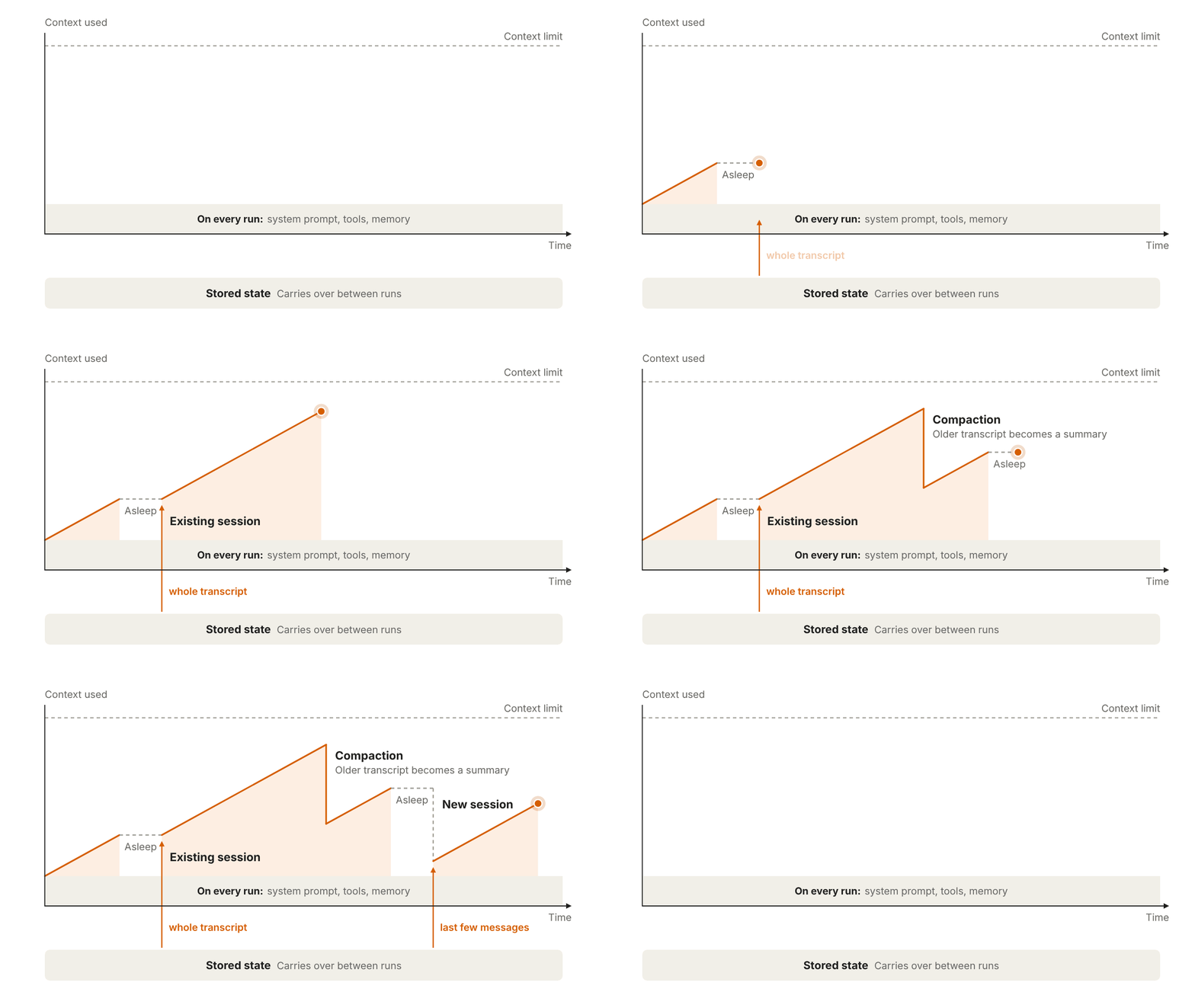
Anthropic published a technical guide on how to build an always-on agent. He Li went through the key points, and the one most worth remembering first is: an always-on agent is not running nonstop 24 hours a day. It is asleep almost all day, wakes up to do a small batch of work, saves its state, and then goes back to sleep.
The guide breaks it into five building blocks.
1. Event Inbox
Put a database table between the webhook and the agent. All events are first written into the table, and the worker pulls them from the table. Don't let the event source call the agent directly: if two events arrive at the same time, they'll start two runs that collide with each other, and if the worker crashes, the events are lost too.
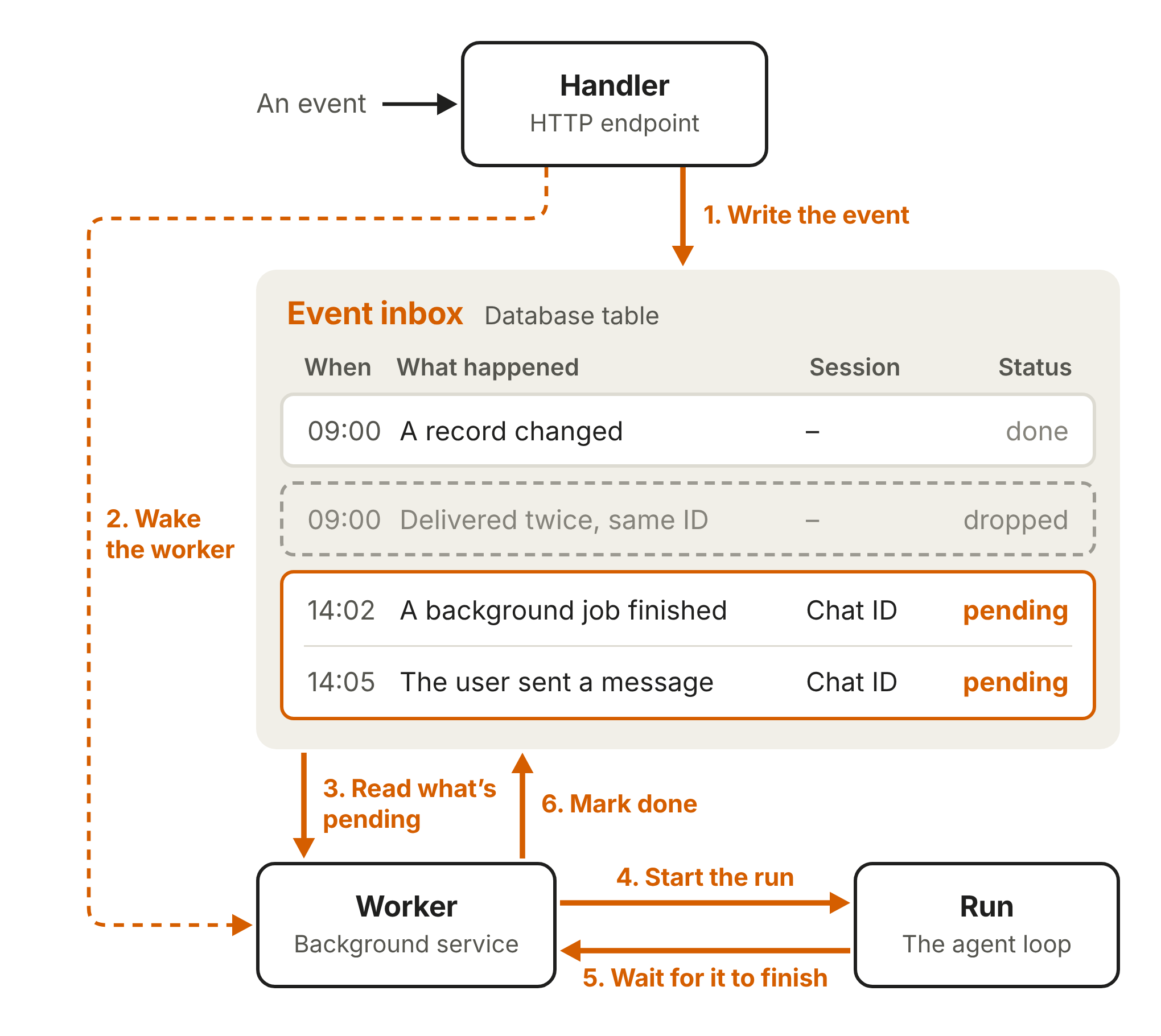
A few practical details: the handler should acknowledge an event as quickly as possible after receiving it, and leave deep validation for the run; the inbox is the single source of truth, so when the worker is woken up it first pulls the latest state from the table; only one worker is opened for the same inbox at any one time; events that come in back-to-back within a short period are merged into one run. A commenter added that when two webhooks are sent in succession, it's more reliable to base the deduplication key on the message id.
2. Timers
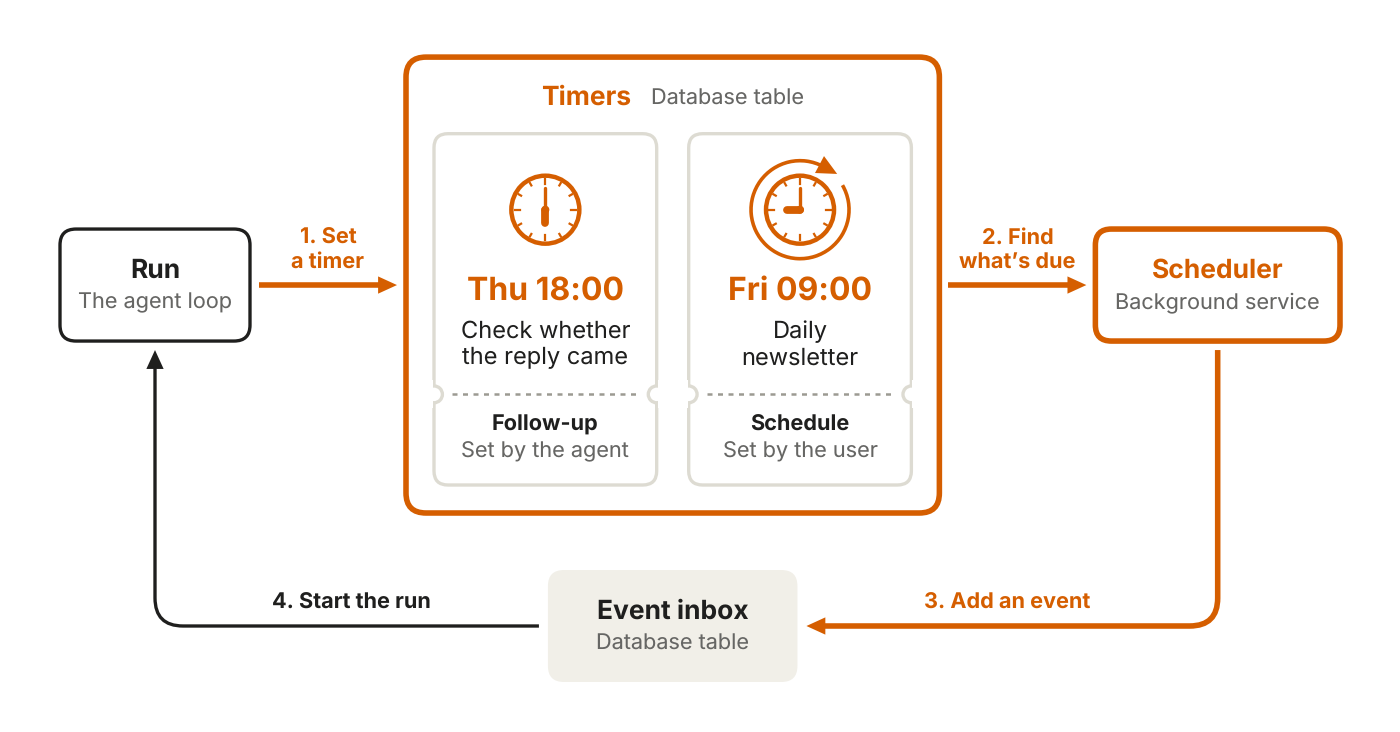
Timers get their own table and are not mixed in with the inbox. There are two types: one-off follow-ups, deadlines the agent sets for itself; and recurring schedules, repeated tasks set by the user. A scheduler in the background polls, and when something is due it puts an event into the inbox.
3. Lean Memory + Dreaming
Memory keeps only what cannot be looked up again: user instructions, user notes, past messages, and task progress. If it can be found elsewhere, store a pointer instead of copying it.
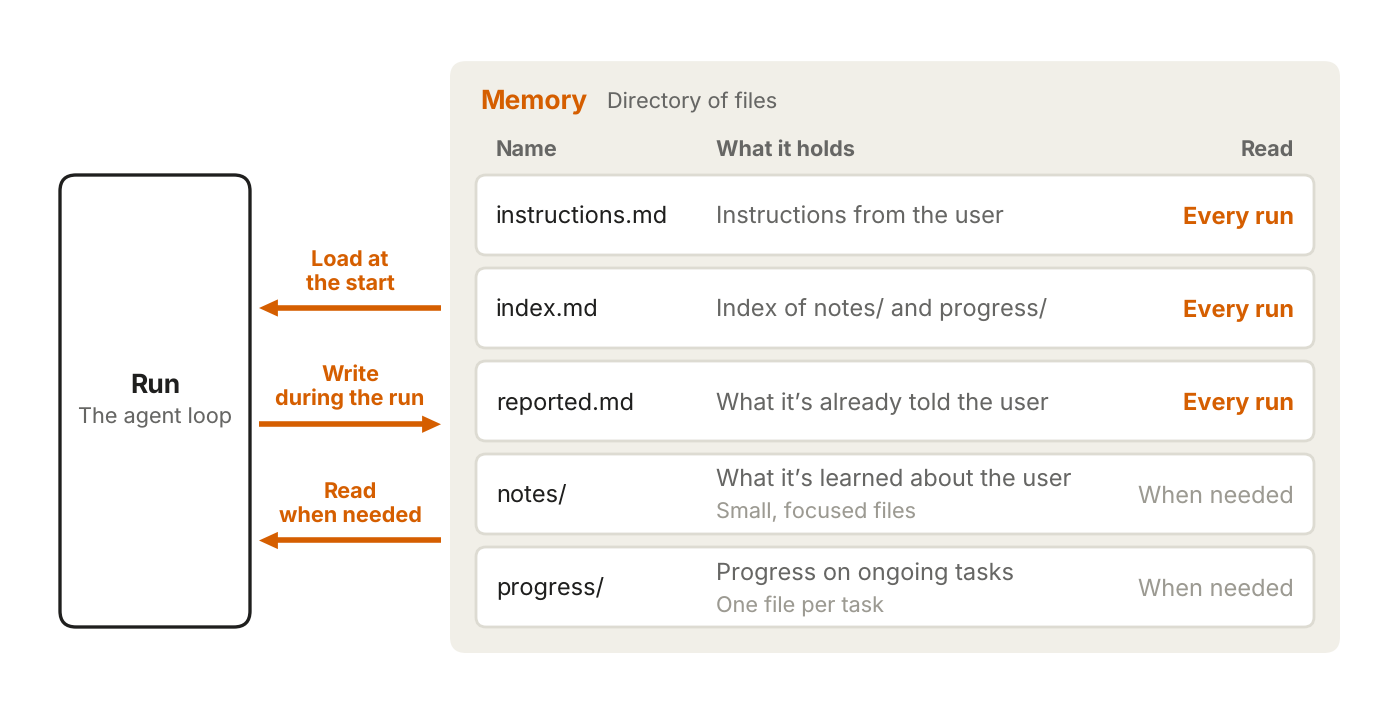
Each time it wakes up, it first reads a short index, and only opens specific files when it needs details. After running for a long time, it also does dreaming: clearing out stale content and finding patterns that only emerge across multiple runs. In the comments, the commenter 副驾本人 shared their approach: the index is just one file, each note takes up one line, with the date and source file, and it automatically checks for expiration when starting work. Dominik mentioned that reading only the short index instead of stuffing all the files in saves a lot of context.
4. Unattended Permissions
Don't put the raw API key directly inside the agent sandbox; wrap it with a proxy outside and inject credentials when making requests. For high-risk actions, use Deferred Tool Calls to pause and wait for human approval: the run ends, the session is saved, and the user's reply comes back as a new event to continue running, so the worker doesn't have to sit idle waiting.
5. Outbox
Replies are first queued, and a dispatcher delivers them at a controlled pace. Let the agent control the push rate itself, so it doesn't flood people at 3 a.m.
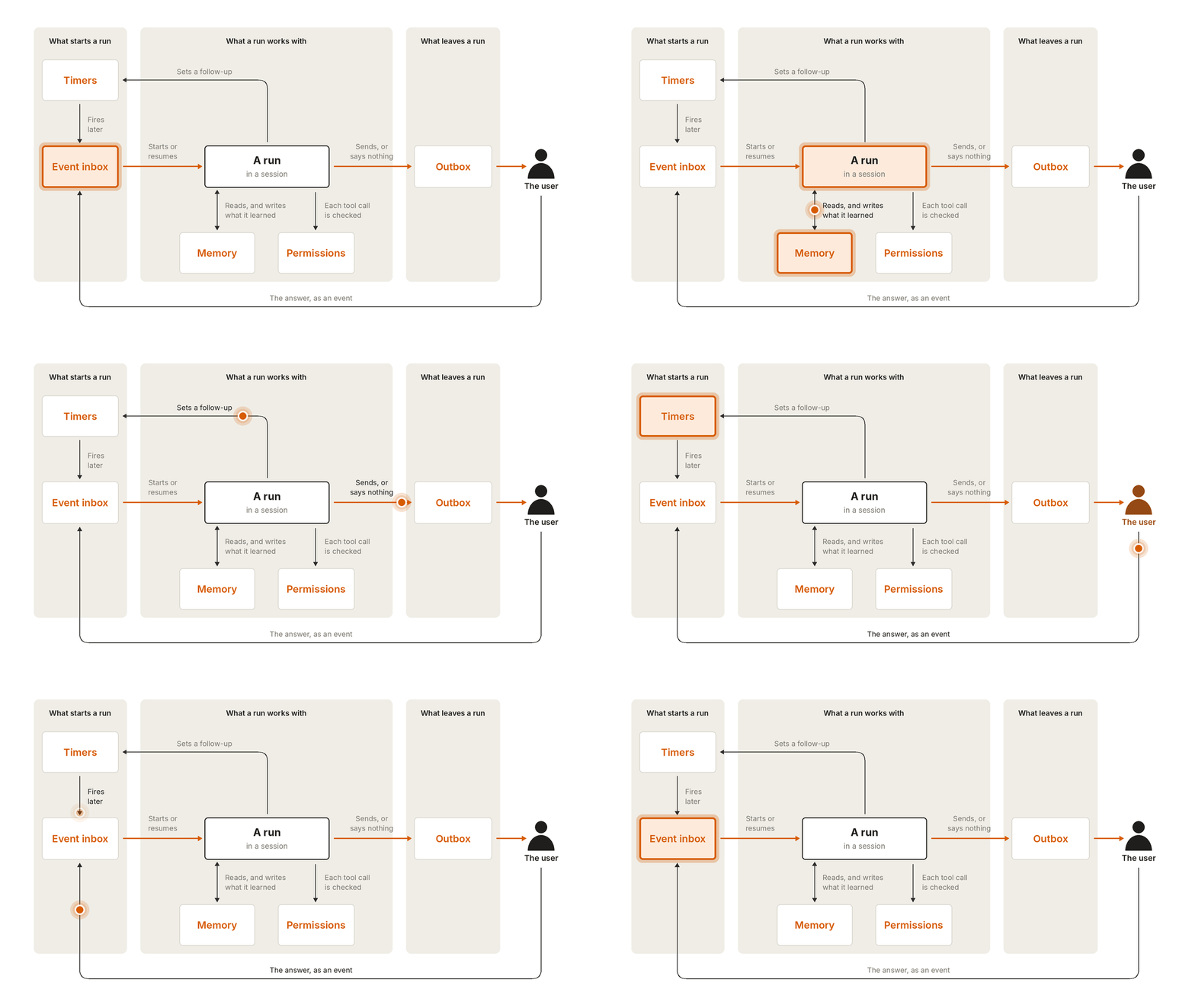
The architecture diagram is very clean. But someone in the comments has already run into the part the documentation doesn't cover.
The commenter 云之子 said that when the midnight run woke up, the service refused connections, and it tried three times. What was saved was still the successful record from four days earlier, and the error was empty. In the morning, the dashboard only showed that it had not been confirmed yet.
This part is closer to everyday reality than any diagram in the guide. The five modules describe what it looks like once everything works; what really grinds you down is the moment it doesn't work: whether state was persisted, whether failures left a trace, and whether retries will duplicate work. Kevin Lin put it bluntly: saving state is the key. Whether it can continue after an interruption and whether failed messages can be found affect the day-to-day experience more than appearing to be always online.
Lao Wang Lab added another angle: being able to sleep only saves money; it's only when it wakes up and knows whether the task still needs doing that it feels like an assistant. A reminder queued half an hour earlier may already have been handled by the user, and executing it as usual just creates trouble. Besides receiving tasks, the inbox should ideally also catch cancellations and changes of mind.
This week's GitHub star-gain leaderboard also has several projects dealing with the same class of problem. herdr has made disconnect-and-reconnect a selling point; the real trouble with long tasks is that after reconnecting, you can't tell whether it's still running or has to start over. claude-mem carries conversation memory into the next session. The top-ranked security-audit-skill has independent agents cross-verify findings: the agent that finds issues and the agent that verifies issues are not the same one.
What they each add is the layer outside the model. The hard part of an always-on agent is not keeping it awake, but making it know, after it wakes up, what has happened and what has not happened yet.
发布时间: 2026-11-15 08:36