Google Puts Robotic Arm Debugging Into a Chat Window—an Hour Later, It Starts Sorting Snacks
Gemini 4 Hydrogen and the Antigravity robotics plugin package drivers, calibration, MuJoCo simulation, and control code into a conversational workflow. The demo is smooth, while the comments ask about sim-to-real, contact dynamics, and cheap robotic arm support.
Google DeepMind has released Gemini 4 Hydrogen and added a robotics plugin to Google Antigravity. The official description is straightforward: connect a supported robotic arm, train it in MuJoCo, and then use everyday conversation to run tasks in the real world.
A quick bit of background. Over the past month, Gemini 4 Argon and Carbon have brought physical reasoning into robotics: they can understand 3D scenes, reconstruct environments, practice in simulation, and control a robotic arm from camera images. Hydrogen is a faster, cheaper version positioned for everyday use.
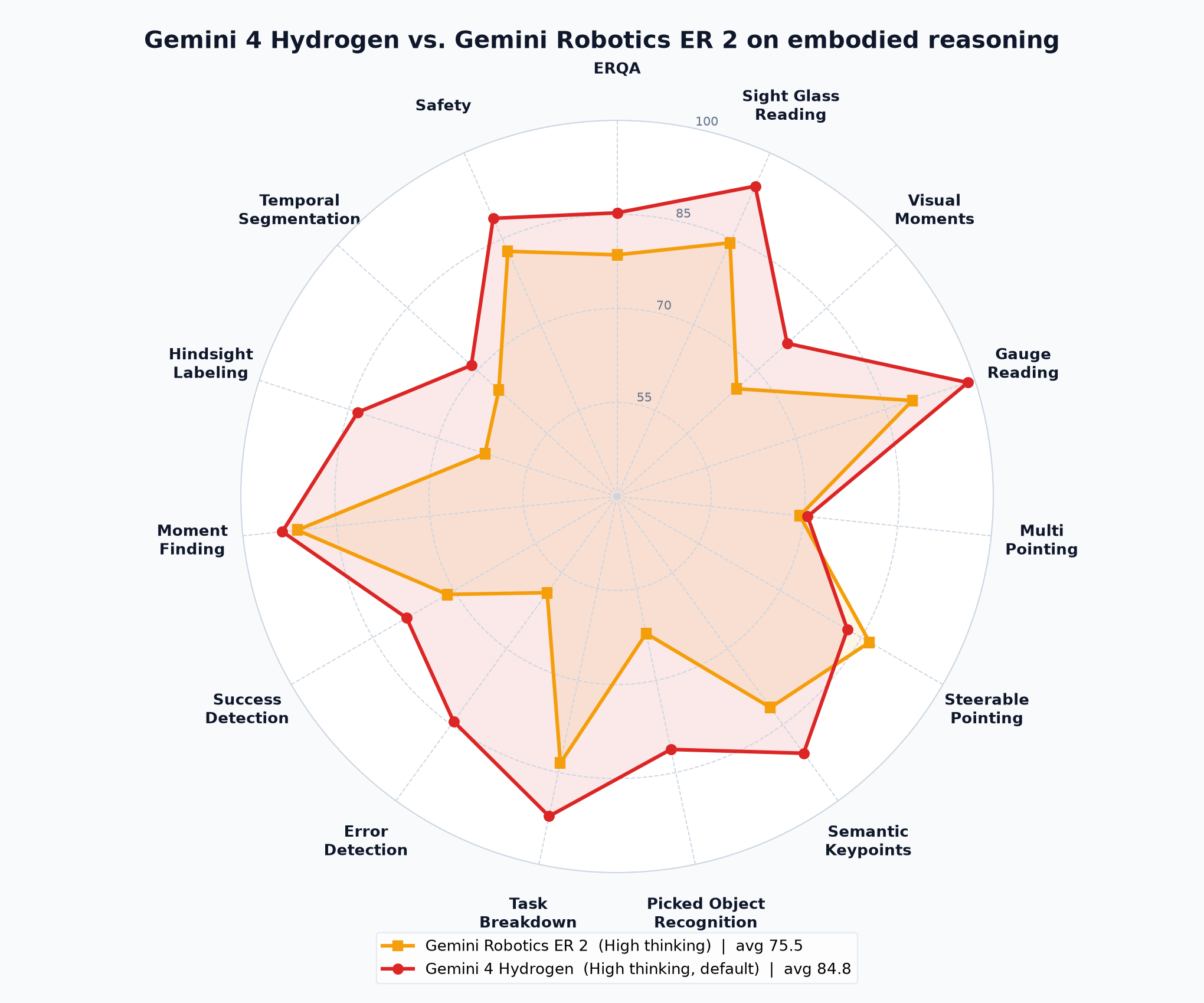
The official blog gives two metrics. On the Artificial Analysis Robotics 0.1 benchmark, Hydrogen controls a real 6-axis robotic arm to complete 8 tabletop tasks and scores 58, close to Argon, with lower cost per token. On ERQA, it surpasses Gemini Robotics ER 2, with strengths in multi-view correspondence and 3D trajectory reasoning. Google recommends that developers currently using ER 2 try Hydrogen.

The plugin packages the dirty work of robotics engineering into skills: driver installation, camera discovery, robotic arm calibration, safe motion validation, MuJoCo scene generation and preview, object localization, grasp planning, closed-loop control, and controller code generation. It can be installed by searching for Robotics in Antigravity's Customizations. A Google AI Pro or Ultra subscription is required.
Concrete workflow: start from an empty table, plug an I2RT YAM robotic arm and depth camera into a laptop, and have Hydrogen do the bring-up. In about 10 minutes, the robotic arm is calibrated and can run test motions. The same workflow also worked with the low-cost SO-ARM101 and the industrial-grade FR3 Duo. Then prompts can make the robotic arm dance, pick up a pen, or stack snacks.
For simulation, MuJoCo runs directly inside Antigravity. Upload photos, import links or documents, or generate scenes with prompts. Change shapes, positions, and physical properties in the chat, validate reaching and grasping, and then deploy to hardware. The official demo goes from a whiteboard sketch to a conveyor-belt snack sorter in about an hour. There are also a soap shop's dual-arm order packing and FR3 Duo playing chess. The original article has videos.
The comment section is more honest than the launch event. One commenter said that putting a pen on the table is a clever first test: it's cheap and easy to reset if something goes wrong. Someone wants to teach the robotic arm to fold a fitted sheet and see who gives up first. Someone asked whether the plugin will force tasks to pass in MuJoCo before allowing real-machine attempts. Someone directly asked about the sim-to-real translation loss and which robotic arms the plugin actually supports. Another commenter pointed out that contact-rich grasping is where simulation most easily lies quietly; whether a policy trained in MuJoCo remains stable the first time it touches a real object is the real test. Wet cups, visual transfer, and contact dynamics come up repeatedly.
These concerns are not unfounded. Natural language is the entry point; what is really being compressed is the debugging pipeline. Previously, building a robotics application meant piecing together drivers, calibration scripts, simulators, perception code, and a UI. Now these are packed into one workbench, and prototyping speed will change. But a one-hour demo is a tuned path. A wet cup in a real kitchen and a clean block in simulation are not the same thing. The officially listed supported hardware includes YAM, SO-ARM101, and FR3 Duo; the materials do not provide a complete support list. Hobbyists who want to use cheap arms should first confirm the plugin's support scope.
The most worthwhile thing in the launch information is the workflow: simulate first, then real hardware. One commenter joked that robotics finally has a staging environment. Another joke is that for the first time, 'works on my machine' really refers to the machine. Google has moved the trial-and-error cost of robotics development forward—into the chat box and MuJoCo. As for whether this can reduce robotic arm failures in the real world, we'll have to see the result of the first wet-cup grasp.
Entry points: In Antigravity, select gemini-4-hydrogen and search for Robotics in Customizations. For the Gemini API, use gemini-4-hydrogen; AI Studio lets you try spatial prompting and real-time camera streaming. Official article: https://goo.gle/4eHJVez . Tweet: https://x.com/GoogleDeepMind/status/2122767521925230896
发布时间: 2026-11-18 03:27